Thursday, October 22, 2015

Zawgyi Font for APPLE - MAC OS

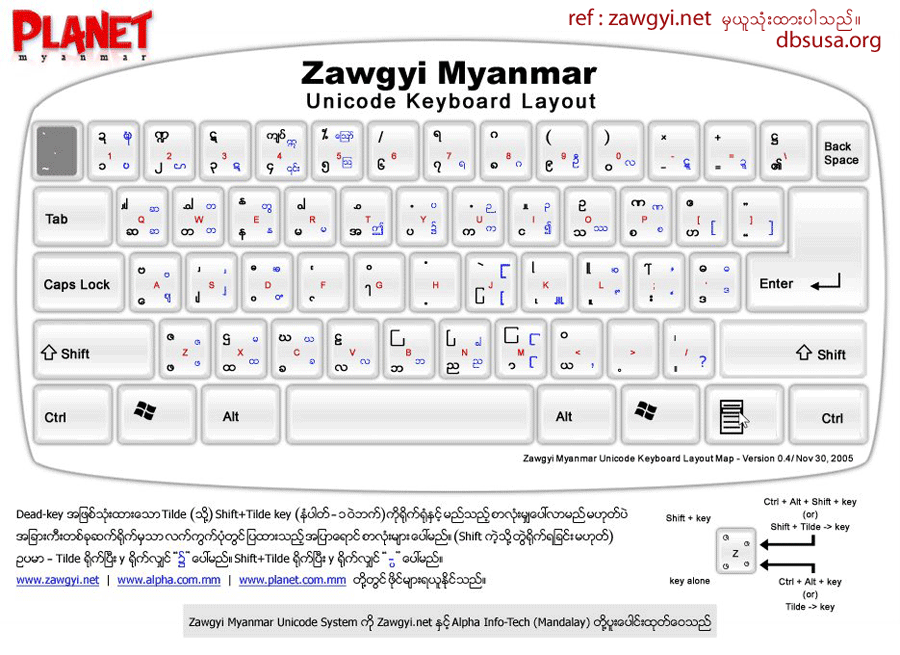
Here is the instruction for how to download and install Zawgyi Font (Burmese) in a MAC OSX (Apple Computer). Keyboard layout is the same with Windows, but do research yourself when you are trying to use (Alt) key in OSX (press and hold “Option”key down)  instead of (Atl+Tide) key in Windows. ထပ္ဆင့္စာလံုုးေတြရိုုက္ခ်င္ရင္ “Option” key ကိုု ဖိထားရင္းရိုုက္ရပါတယ္။ တစ္ခ်ိဳ႔ကို “Option+Shift” သံုးရပါတယ္။

::INSTRUCTION::
(1) Download “zawgyi.dmg” file
(2) Open it. Drag files into appropriate folder as the guide diagram
(3) Open System Preferences > Languages & Text > Input Sources > Zawgyi KB
……(Check mark “Zawgyi KB”, it will be at the bottom)
For OSX 10.9.1 (above) users, you can choose built-in Myanmar (QWERTY) keyboard at Input Sources for Burmese Keyboard.
(4) Remove “Myanmar MN” and “Myanmar Sangam MN” fonts from the Font Book
……( >Applications > Font Book)
(5) Restart your MAC

Wednesday, December 24, 2014

Myanmar 3 Unicode Font for Windows OS and Mac OS

ယေန႔ Blog အမ်ားစုေတြျဖစ္ေစ၊ Blogger ေတြအတြက္ ပိုမိုအဆင္ေျပႏိုင္ၿပီး Unicode System အသုံးျပဳထားတဲ့ Myanmar 3 Font ပဲျဖစ္ပါတယ္။ ၄င္းဟာ Myanmar 3 Unicode System ျဖင့္ ေရးသားထားေသာ ဘေလာ့ဂ္မ်ား၊ ဘက္ဆုုိက္မ်ားတုုိ႔၏ စာမ်က္ႏွာမ်ားမွ ျမန္မာစာမ်ားကိုလည္း ဖတ္ရႈ႕ႏိုင္ပါတယ္။ ေအာက္ပါေဖာ္ျပထားေသာ Links အတိုင္း Browser ဖြင့္ၿပီး ရုိက္ထည့္ Download ယူၿပီး ထည့္သြင္းႏိုင္ပါတယ္။


**MM3 = Myanmar 3

Sunday, January 9, 2011

Whizzo Myanmar Typing Tutor (ျမန္မာစာလက္ကြက္က်င့္ရန္)

Whizzo Myanmar Typing Tutor ျဖင့္ ျမန္မာစာလက္ကြက္ေတြကို စနစ္တက်နဲ႕ ျမန္ျမန္ရိုက္ႏိုင္ေအာင္ ေလ့က်င့္ေပးႏိုင္တဲ့ Software ျဖစ္ပါတယ္။ အလိုရွိသူမ်ား ေအာက္မွာ Download ယူႏိုင္ပါၿပီ ...

>>> Download Whizzo Myanmar Typing Tutor

Saturday, January 8, 2011

Zawgyi Font for iOS 7.0 - Install Myanmar Font on iPhone / iPad

To read Myanmar language by using Zawgyi Font on your iOS 7.0 of either iPhone or iPad.
iPhone (သုုိ႔) iPad ရဲ့ iOS 7.0 မွ ျမန္မာစာလုုံုးမ်ားကိုု ဖတ္ႏုုိင္ရန္ ေဇာ္ဂ်ီေဖာင့္ကုုိ သြင္းျခင္း။

(၁) ဒီ link http://d.pr/f/M8Es+ ကုုိ copy လုုပ္ၿပီး Safari web browser ေပၚမွာ ဖြင့္ပါ။
(1) Copy http://d.pr/f/M8Es+ and open into Safari web browser in your iPhone or iPad.

(၂) ရလာမယ့္ file ကုုိ install လုုပ္လုုိက္ပါ။ ထုုံးစံအတုုိင္း ထြက္လာမယ့္အညြန္းအတုုိင္းလိုုက္ပါ။ Ok သြားမယ္။ Easy ေလးပါ။
(2) You will get a file to be installed into your iPhone or iPad. Click to install and follow the steps as usual. Done! You will enjoy.

ဒါမွမဟုုတ္ရင္ ေအာက္က Youtube Video ကုုိၾကည့္ပါ။ http://www.myanmarteach.blogspot.com/ ဒီ video အတြက္ အမ်ားႀကီး ေက်းဇူးတင္ပါတယ္။

Wednesday, January 5, 2011

Alpha Zawgyi Unicode for Windows 7, 8 (64-bit)

Windows 7 (64bit)နဲ႕ Windows 8 (64bit) ေတြအတြက္ Alpha Zawgyi Unicode ပါ။ အျခား Windows system 64 bit ေတြအတြက္ အဆင္ေျပတဲ့ Myanmar Unicode ေလးပါ။ ေအာက္ပါ Link အတိုင္း Download ယူႏိုင္ပါတယ္။

>>> Download Alpha Zawgyi Unicode for Windows 7, 8 (64 bit) ကို ေဒါင္းလုဒ္လုပ္ရန္
(၄င္း လင့္ကုိ Browser မွာရုိက္လုိက္ပါ။)


>>> Download ႏွင့္ ထည့္သြင္းနည္း


Myanmar Unicode Download - Free Alpha Zawgyi

Zawgyi Myanmar Unicode Keyboard is totally a free download software developed by Zawgyi.net & Alpha Mandalay. Thanks to the developers...